FTP stands for File Transfer Protocol and is commonly used to transfer files. If you are submitting images for calibration be sure to resize images to 2000 pixels wide and save at medium resolution before uploading. Downsizing in this manner will result in image files of approximately 200K. For Raw images just upload the original Raw file. My FTP server has a 1GB capacity so please keep this in mind.
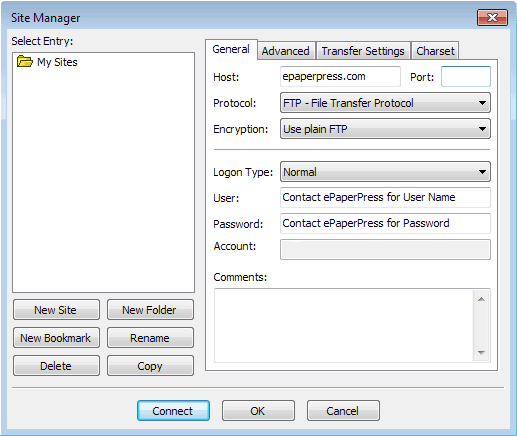
Use an FTP Client such as FileZilla Client (it's free and easy to use) to FTP files to ePaperPress. Choose File > Site Manager and configure as follows:
Then do the following:
Be sure to do step #3 or your images will just gather dust on my server!